JPG to PDF Converter Online Free – Convert Images to PDF Instantly Without Uploading
By Admin | Category: Jpg to Pdf Tool | Views: 0
JPG to PDF Converter Online Free – Convert Images to PDF Instantly Without Uploading
Looking for a fast, secure, and easy way to convert JPG to PDF online? You are in the right place! Our JPG to PDF Converter helps you convert single or multiple images into a professional PDF document within seconds.
Unlike many online PDF converters, our tool is designed to be lightning fast ⚡, user-friendly, and privacy-focused. Your images are processed directly in your browser, allowing you to create PDF files quickly without complicated steps.
Whether you need to convert school assignments, office documents, invoices, receipts, certificates, scanned pages, photographs, screenshots, or personal records into PDF format, this free online JPG to PDF converter provides everything you need.
Why Convert JPG to PDF?
JPG images are perfect for storing photographs and scanned documents, but PDF files offer better organization, sharing, printing, and compatibility.
Benefits of converting images to PDF include:
- 📄 Combine multiple images into one PDF file
- 📧 Easy to email and share
- 🖨 Better printing quality
- 📚 Keep documents organized
- 🔒 Professional document format
- 📱 Works across all devices and operating systems
- 📂 Easier document storage and archiving
If you regularly work with photos, scanned pages, receipts, assignments, business documents, or reports, converting JPG files to PDF can save time and improve productivity.
Free Online JPG to PDF Converter
Our online JPG to PDF converter is built for speed, simplicity, and flexibility.
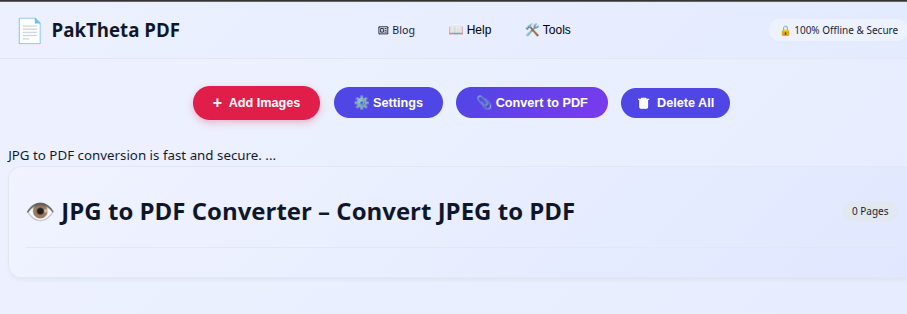
Instead of dealing with complicated software installations, you can simply open the tool, upload your images, customize PDF settings, and generate your PDF instantly.
The tool works directly in your browser and provides a live image preview immediately after selecting your files.
How to Convert JPG to PDF Online
Converting images to PDF is extremely simple. Follow these steps:
Step 1: Add Images
Click the Add Images button and select one or more JPG images from your device.
As soon as the images are selected, the tool automatically generates a preview so you can review your files before creating the PDF.
Step 2: Review Image Preview
The preview section allows you to manage your images easily.
- 🗑 Delete unwanted images
- 🔄 Rotate images left or right
- ↕ Rearrange image positions
- 👀 Preview pages before PDF creation
This helps ensure your final PDF appears exactly as you want.
Step 3: Open PDF Settings
Click the Settings button to customize your PDF.
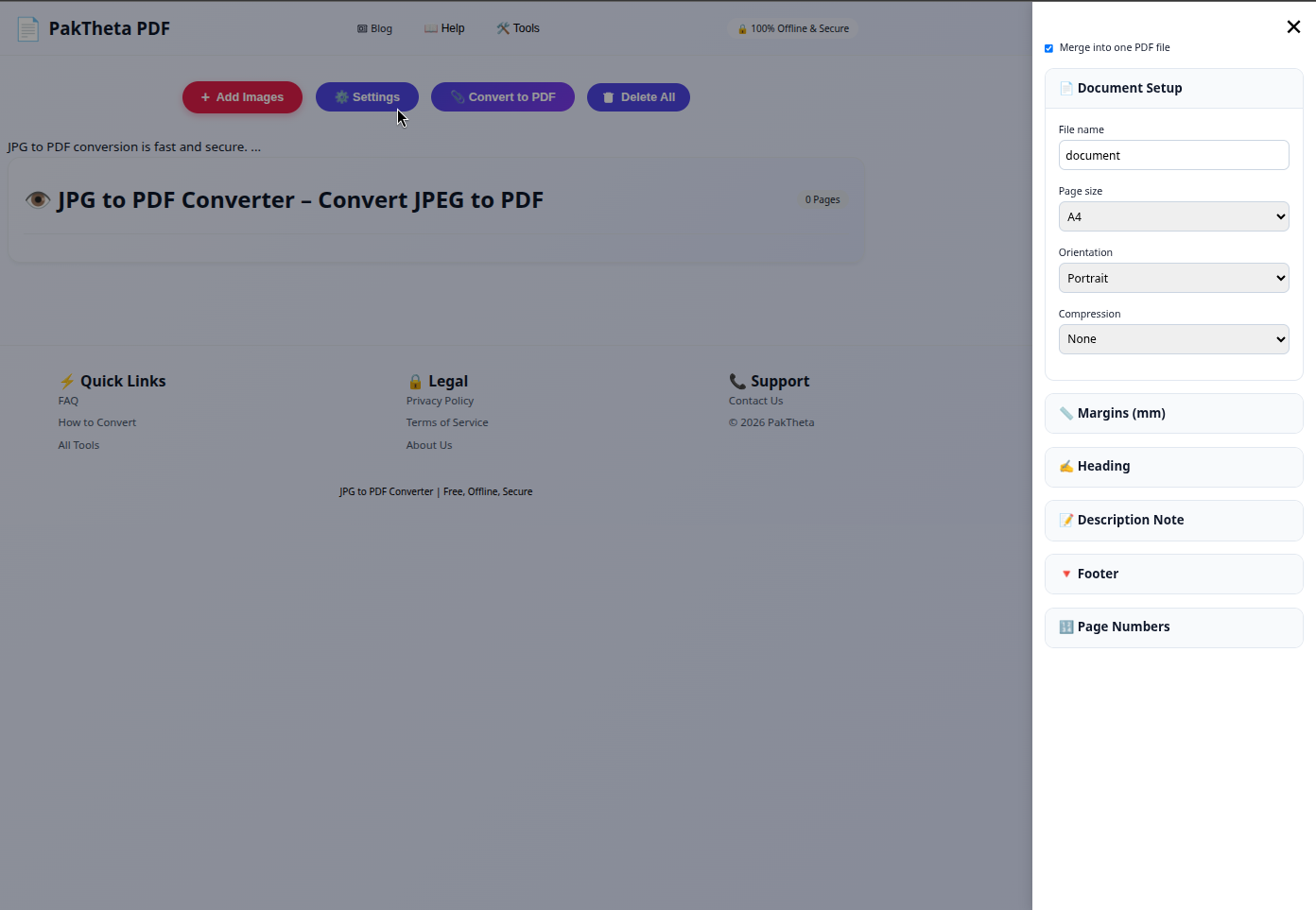
You can configure:
- Page Size
- Page Orientation
- Image Compression
- Margins
- File Name
- Heading Text
- Description Note
- Footer Note
- Page Numbers
These options help you create professional-looking PDF documents for business, education, and personal use.
Step 4: Convert to PDF
After reviewing your images and selecting your preferred settings, simply click the Convert to PDF button.
Your PDF will be generated instantly and downloaded to your device.
No complicated setup. No technical knowledge required.
Instant Image Preview for Better Control
One of the most useful features of our JPG to PDF tool is the instant preview system.
The moment you add images, thumbnails appear automatically. This allows you to:
- Verify image quality
- Check image order
- Remove unnecessary pages
- Rotate incorrectly scanned pages
- Organize the final PDF structure
This saves time and helps avoid mistakes before PDF generation.
Rotate Images Before Creating PDF
Many scanned documents and phone photos are captured in the wrong orientation.
Our built-in image rotation feature lets you rotate pages instantly.
You can correct portrait and landscape images before generating your PDF, ensuring a professional final document.
Delete Unwanted Images Easily
Accidentally selected the wrong image?
No problem.
Simply click the delete option inside the preview area and remove unwanted images before generating the PDF.
This eliminates the need to restart the entire process.
Reorder Images with Drag-and-Drop Control
Image order is important when creating reports, assignments, contracts, presentations, and scanned documents.
The preview area allows you to rearrange image positions before conversion.
You can move pages into the correct sequence and create a perfectly organized PDF file.
Customize PDF Page Size
Different documents require different page sizes.
Our converter allows you to choose the page size that best suits your needs.
Common uses include:
- A4 documents
- Letter size documents
- Legal size documents
- Custom page layouts
This flexibility makes the tool suitable for office work, educational documents, and professional printing.
Choose Portrait or Landscape Orientation
Page orientation plays a major role in document appearance.
You can choose:
- 📄 Portrait Orientation
- 📑 Landscape Orientation
This ensures your images fit perfectly within the PDF layout.
Advanced Compression Options
Large image files can create huge PDF documents.
Our compression settings help reduce PDF size while maintaining image quality.
Benefits include:
- Smaller PDF files
- Faster downloads
- Easier sharing
- Reduced storage requirements
This is particularly useful for email attachments, online submissions, and cloud storage.
Add Custom Heading Text
Need a title on your PDF?
You can add a custom heading text before generating the PDF.
Examples:
- Project Report
- Student Assignment
- Invoice Collection
- Business Proposal
- Photo Album
This feature helps create professional documents quickly.
Add Description Notes to Your PDF
Sometimes a document requires additional information before the actual content begins. Our JPG to PDF Converter allows you to add a custom description note that appears inside your PDF.
This feature is useful for:
- 📚 School assignments
- 🏢 Office reports
- 📋 Project documentation
- 📄 Client submissions
- 📁 Business records
Instead of manually editing PDF files later, you can include important information during PDF creation.
Add Footer Notes for Professional Documents
The Footer Note feature helps users create more professional PDF documents.
You can add:
- Company Name
- Website Address
- Department Information
- Contact Details
- Copyright Information
This is especially useful for businesses, educational institutions, freelancers, and organizations that regularly share PDF documents.
Automatic Page Numbers
When creating multi-page PDF files, page numbers make navigation easier.
Our PDF generator allows you to automatically add page numbers to every page.
Benefits include:
- Easy document navigation
- Professional presentation
- Improved readability
- Better organization
Whether you are creating reports, assignments, presentations, manuals, or business documents, page numbers can significantly improve usability.
Custom PDF File Name
Instead of downloading a file with a generic name, our tool allows you to specify a custom PDF file name before conversion.
Examples:
- Student_Assignment.pdf
- Invoice_Report.pdf
- Project_Documentation.pdf
- Business_Presentation.pdf
- Photo_Album.pdf
This saves time and keeps your files organized.
Why Use Our JPG to PDF Converter?
There are many online PDF tools available today, but not all provide the same experience.
Our converter focuses on simplicity, speed, and flexibility.
Key advantages include:
- ⚡ Lightning-fast conversion
- 📄 Multiple image support
- 👀 Instant image preview
- 🔄 Image rotation tools
- 🗑 Delete unwanted images
- ↕ Reorder images easily
- 📏 Page size customization
- 📐 Orientation settings
- 🗜 Compression options
- 📝 Heading and notes support
- 🔢 Automatic page numbers
- 💾 Custom file naming
- 📱 Mobile-friendly interface
- 💻 Works on all devices
- 🆓 Completely free to use
Perfect for Students
Students frequently need to submit assignments, scanned notes, homework, project reports, and examination documents.
Using our JPG to PDF Converter, students can combine multiple images into a single PDF file and submit their work professionally.
Common student use cases:
- Assignment submission
- Class notes conversion
- Research projects
- Exam preparation materials
- Digital portfolios
Ideal for Teachers and Educators
Teachers can convert educational material into PDF format for easy sharing with students.
This includes:
- Lecture notes
- Worksheets
- Classroom presentations
- Assessment documents
- Learning resources
Useful for Businesses
Businesses often work with scanned documents, receipts, invoices, contracts, reports, and records.
Converting these files into PDF format helps improve organization and document management.
Business use cases include:
- Invoice management
- Contract archiving
- Client documentation
- Expense reports
- Employee records
Create PDF Files from Mobile Devices
Modern smartphones capture high-quality images that can easily be converted into PDF files.
Our converter works seamlessly on:
- Android phones
- iPhones
- Tablets
- Laptops
- Desktop computers
You can convert images to PDF anywhere, anytime.
How to Convert Multiple Images into One PDF
Many users want to combine several images into a single PDF document.
The process is simple:
- Click Add Images.
- Select multiple JPG images.
- Arrange image order using preview controls.
- Adjust PDF settings if required.
- Click Convert to PDF.
- Download your combined PDF file.
This is ideal for scanned documents, reports, presentations, and photo collections.
JPG vs PDF – What's the Difference?
| Feature | JPG | |
|---|---|---|
| Multiple Pages | No | Yes |
| Easy Sharing | Limited | Excellent |
| Professional Format | No | Yes |
| Document Organization | Limited | Excellent |
| Printing Support | Good | Excellent |
PDF files are generally preferred for professional, educational, and business purposes.
Tips for Creating Better PDF Documents
- Use clear and high-quality images.
- Arrange images in the correct order.
- Rotate incorrectly oriented images.
- Choose appropriate page size.
- Enable page numbers for longer documents.
- Add headings for better presentation.
- Use compression for smaller file sizes.
- Include footer information when needed.
Frequently Asked Questions (FAQs)
1. Is this JPG to PDF Converter free?
Yes, the tool is completely free to use.
2. Can I convert multiple images into one PDF?
Yes, you can combine multiple JPG images into a single PDF document.
3. Can I rearrange image order?
Yes, images can be reordered from the preview section before PDF creation.
4. Can I delete unwanted images?
Yes, you can remove any image before generating the PDF.
5. Can I rotate images?
Yes, image rotation controls are available in the preview area.
6. Can I change page orientation?
Yes, you can choose portrait or landscape orientation.
7. Can I choose page size?
Yes, multiple page size options are available.
8. Can I compress images?
Yes, compression settings help reduce PDF file size.
9. Can I add a heading to my PDF?
Yes, custom heading text can be added before PDF generation.
10. Can I add a description note?
Yes, you can include custom description notes.
11. Can I add footer notes?
Yes, footer notes can be added for professional documents.
12. Can I include page numbers?
Yes, automatic page numbering is supported.
13. Can I choose a custom file name?
Yes, you can specify the PDF file name before downloading.
14. Does it work on mobile devices?
Yes, the tool works on Android, iPhone, tablets, and desktop devices.
15. Is registration required?
No, you can use the converter instantly without registration.
16. Can I convert scanned documents?
Yes, scanned pages can easily be converted into PDF format.
17. Is the converter easy to use?
Yes, the entire process requires only a few clicks.
18. How fast is the conversion process?
The tool is optimized for lightning-fast PDF generation.
19. Can I create professional PDF documents?
Yes, advanced customization options help create professional PDFs.
20. Where can I start converting images?
You can start immediately using our JPG to PDF Converter.
Start Converting JPG to PDF Today 🚀
If you need a fast, reliable, and easy-to-use JPG to PDF converter, our tool is the perfect solution.
With instant preview, image rotation, image deletion, drag-and-drop ordering, page size settings, orientation controls, compression options, custom headings, description notes, footer notes, page numbers, and custom file naming, you have everything required to create professional PDF documents in seconds.
👉 Try the tool now: https://paktheta.com/pdf/jpg-to-pdf
Convert images to PDF quickly, organize documents efficiently, and create professional PDFs with just a few clicks.
Comments
No comments yet. Be the first to comment!