Best iLovePDF Alternative in 2026
By Admin | Category: Jpg to Pdf Tool | Views: 0
Best iLovePDF Alternative in 2026 – Fast, Free, Secure JPG to PDF Converter Without Complicated Steps 🚀
If you have ever searched for a way to convert JPG to PDF online, chances are you have come across iLovePDF. It is one of the most popular PDF tools on the internet. However, many users today are looking for an iLovePDF alternative that is simpler, faster, and easier to use.
We understand the frustration 😓. Sometimes you just want to convert a few images into a PDF without navigating through multiple screens, unnecessary options, or confusing workflows.
That is exactly why we created our Free JPG to PDF Converter.
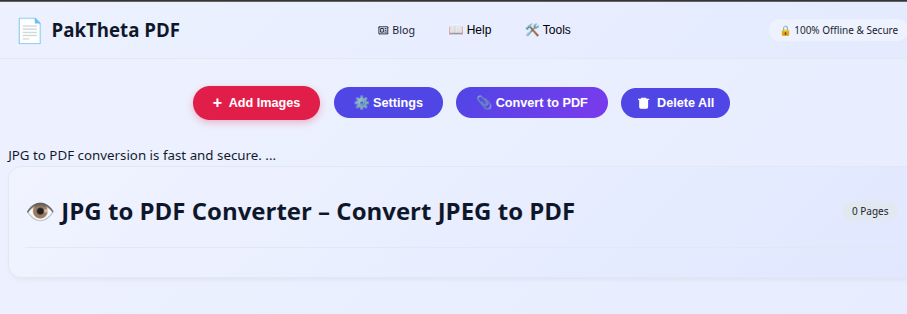
Our goal was simple: create a fast, easy-to-use, and user-friendly image to PDF converter that anyone can use within seconds.
Whether you are a student submitting assignments, an office worker organizing documents, a teacher sharing notes, or someone simply creating a PDF from photos, our tool is designed to help you complete the task quickly and efficiently.
Why People Search for an iLovePDF Alternative?
iLovePDF is a well-known platform, but every user has different needs.
Many users search for alternatives because they want:
- ⚡ Faster PDF creation
- 📱 Better mobile experience
- 🖼 Easier image management
- 📄 More customization options
- 🎯 Simpler interface
- 🚀 Quick image preview
- 📂 Better control over PDF layout
We built our tool specifically around these requirements.
What Makes Our JPG to PDF Tool Different?
Most PDF converters focus only on converting files.
We focus on making the entire experience smooth and enjoyable.
As soon as you add images, the preview appears instantly. There is no waiting around wondering whether your files were selected correctly.
You immediately gain control over every image before creating the final PDF.
Convert JPG to PDF in Just Two Simple Steps ✨
One of the biggest advantages of our Online JPG to PDF Converter is simplicity.
Step 1: Click Add Images
Click the Add Images button and choose the JPG files you want to convert.
Immediately after selecting the images, a live preview appears.
This allows you to verify everything before generating your PDF.
Step 2: Click Convert to PDF
Once your images are ready, simply click the Convert to PDF button.
Your PDF file will be generated instantly and downloaded directly to your device.
No technical skills required. No complicated setup. Just a few clicks and you are done. 🎉
Instant Preview Makes Everything Easier 👀
One feature that users absolutely love is our instant image preview.
The moment images are added, thumbnails appear automatically.
This gives you complete visibility and control over your PDF before it is created.
Instead of guessing what your PDF will look like, you can see everything beforehand.
Delete Images Before Creating the PDF 🗑
Accidentally selected an image you do not need?
No worries.
Simply delete unwanted images from the preview area.
This saves time and prevents mistakes.
You do not have to restart the process from the beginning.
Rotate Images Instantly 🔄
Many photos and scanned documents are captured in the wrong orientation.
Our built-in rotation feature lets you rotate images directly from the preview screen.
This ensures every page looks professional inside the final PDF.
Change Image Position with Ease ↕
Document order matters.
Whether you are creating:
- Assignments
- Reports
- Invoices
- Business documents
- Scanned records
You can rearrange image positions before conversion.
This gives you complete control over how pages appear in the final PDF.
Advanced PDF Settings for Professional Results ⚙️
Many basic PDF converters stop after file conversion.
We wanted to provide much more flexibility.
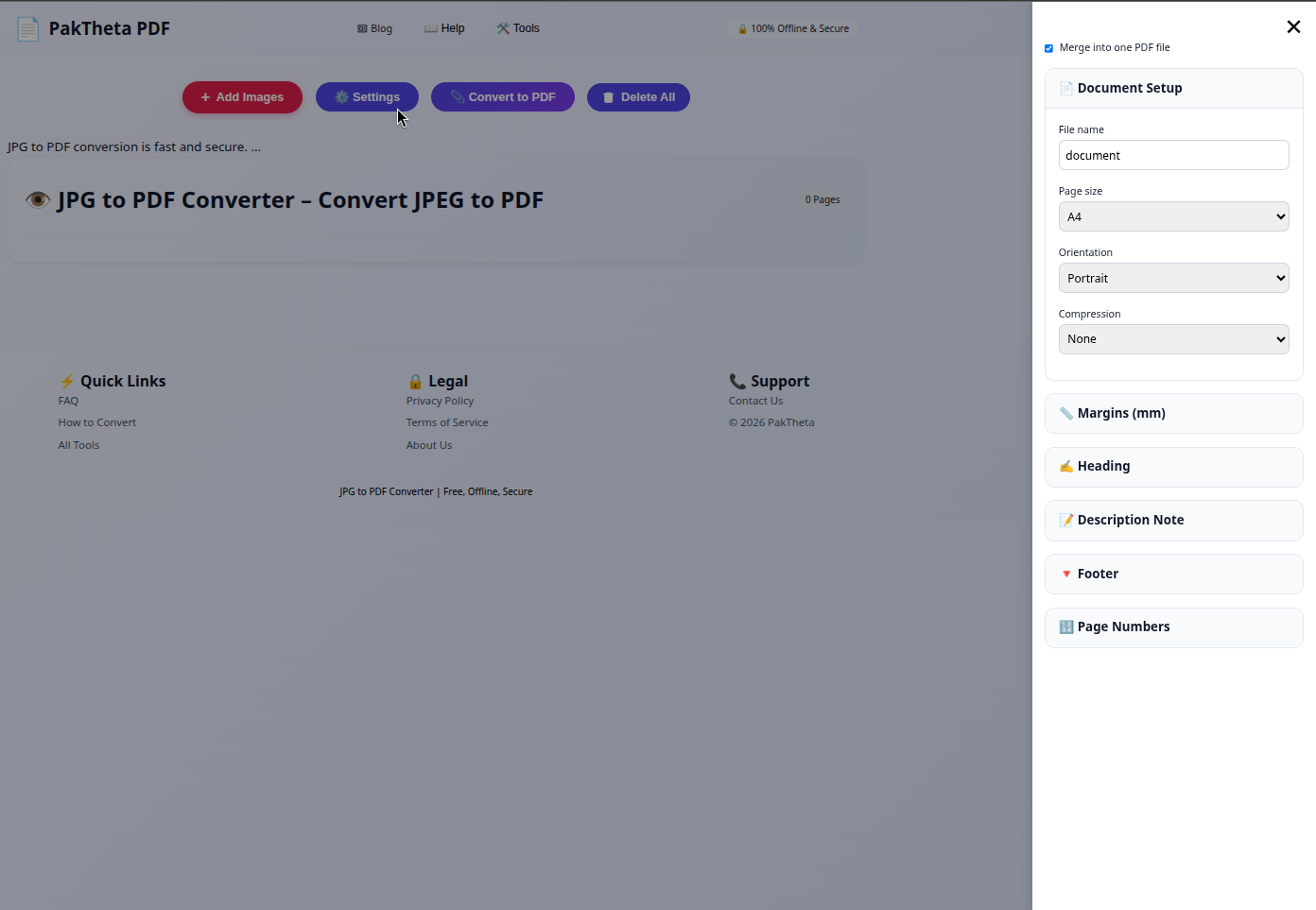
Using the Settings button, you can customize your PDF exactly the way you want.
Page Size Options
Different documents require different layouts.
You can choose page sizes suitable for:
- A4 Documents
- Letter Documents
- Legal Documents
- Custom Printing Requirements
Page Orientation
Select the orientation that best matches your content:
- Portrait Mode
- Landscape Mode
This helps create cleaner and more readable PDF documents.
Image Compression
Large images often create huge PDF files.
Our compression settings help reduce file size while maintaining good quality.
This makes PDF files easier to:
- Upload
- Share
- Store
Custom Margins
Margins improve document presentation.
You can adjust margins to create a clean and professional appearance.
Custom File Name
Instead of downloading a generic file name, you can create your own.
Examples:
- Assignment.pdf
- Business_Report.pdf
- Invoices.pdf
- Photo_Album.pdf
Add Heading Text to Your PDF 📝
Sometimes documents need a clear title.
Our converter allows you to add a custom heading before generating the PDF.
This is perfect for:
- Student Assignments
- Office Reports
- Business Proposals
- Project Documentation
Add Description Notes
Need additional information before the document starts?
You can add custom description notes directly from the settings section.
This helps explain the purpose of the PDF and improves organization.
Add Footer Notes
Footer notes are useful for professional documents.
You can include:
- Company Name
- Website Address
- Contact Information
- Copyright Details
This gives your PDF a polished and professional appearance.
Automatic Page Numbers 🔢
When creating multi-page PDF files, page numbers are incredibly useful.
Our tool allows you to automatically include page numbers throughout the document.
This improves navigation and document readability.
Lightning Fast Performance ⚡
Speed matters.
No one likes waiting for file conversions.
Our PDF converter is optimized for fast processing and quick downloads.
Images appear instantly in the preview area and PDF generation happens within moments.
This helps users save time and complete tasks more efficiently.
Perfect for Students 🎓
Students frequently need to submit assignments, notes, homework, projects, and reports.
Our Image to PDF Converter makes the process incredibly simple.
Instead of sending multiple image files, students can combine everything into a single PDF document.
Ideal for Businesses 🏢
Businesses handle invoices, receipts, contracts, forms, reports, and scanned documents every day.
Creating organized PDF files improves document management and professionalism.
That is why many business users prefer our PDF conversion tool for daily document workflows.
Frequently Asked Questions (FAQs)
What is the best iLovePDF alternative?
If you need a simple and fast image to PDF converter with instant preview, image management, page customization, and PDF settings, our JPG to PDF tool is an excellent alternative.
Can I convert multiple JPG images into one PDF?
Yes. You can combine multiple images into a single PDF document.
Can I delete images before conversion?
Yes. Unwanted images can be removed directly from the preview area.
Can I rotate images?
Absolutely. Rotation controls are available before PDF generation.
Can I change image order?
Yes. Images can be rearranged to create the perfect PDF structure.
Can I add page numbers?
Yes. Automatic page numbering is supported.
Can I customize PDF settings?
Yes. You can adjust page size, orientation, compression, margins, headings, descriptions, footers, and file names.
Is this JPG to PDF Converter free?
Yes. The tool is completely free to use.
Final Thoughts 🚀
If you are searching for the best iLovePDF alternative, we believe simplicity, speed, and flexibility matter the most.
Our tool provides instant image preview, image rotation, image deletion, image reordering, compression settings, page customization, page numbering, headings, descriptions, footers, and much more.
Whether you need to convert a single image or combine multiple JPG files into one professional PDF document, our converter makes the process quick and effortless.
👉 Start now using our Free JPG to PDF Converter and create professional PDF files within seconds.
iLovePDF vs Our JPG to PDF Converter – Detailed Comparison 📊
Many users ask us a simple question:
"Why should I choose your JPG to PDF Converter instead of iLovePDF?"
The answer depends on your needs.
If your primary goal is quickly converting images into a PDF while maintaining complete control over image arrangement, page settings, and PDF customization, our tool provides a streamlined experience focused specifically on image-to-PDF conversion.
| Feature | Our JPG to PDF Tool | Typical PDF Converter Experience |
|---|---|---|
| Fast JPG to PDF Conversion | ✅ | ✅ |
| Instant Image Preview | ✅ | May Vary |
| Delete Images Before PDF Creation | ✅ | May Vary |
| Rotate Images | ✅ | May Vary |
| Change Image Position | ✅ | Limited |
| Custom Heading Text | ✅ | Limited |
| Description Notes | ✅ | Limited |
| Footer Notes | ✅ | Limited |
| Page Numbers | ✅ | Limited |
| Custom Margins | ✅ | Limited |
| Page Size Control | ✅ | May Vary |
| Orientation Control | ✅ | May Vary |
Who Should Use This JPG to PDF Converter?
Our converter is designed for anyone who works with images and documents regularly.
Students 🎓
Students can combine assignment pages, handwritten notes, project reports, diagrams, and scanned documents into a single PDF file.
Teachers 👨🏫
Teachers can create educational material, worksheets, and learning resources that are easy to share with students.
Office Workers 💼
Office professionals can organize invoices, contracts, receipts, reports, and scanned records efficiently.
Freelancers 🚀
Freelancers can create professional proposals, client reports, portfolios, and documentation.
Small Businesses 🏢
Small business owners can convert important records into organized PDF documents for storage and sharing.
Advanced PDF Creation Features
Creating a PDF should not simply be about converting images.
Professional documents require flexibility and customization.
That is why our tool includes advanced PDF settings that help users create polished documents without needing expensive software.
Smart Page Layout Control
Every document is different.
Some documents look better in portrait orientation while others require landscape mode.
Our page layout settings help you create the perfect PDF presentation.
Professional Document Structure
By combining:
- Heading Text
- Description Notes
- Footer Notes
- Page Numbers
You can create documents that look organized and professional.
Common Use Cases
Convert Assignment Images to PDF
Students often capture assignment pages using their mobile phones.
Instead of submitting multiple images, they can combine everything into a single PDF file.
Convert Receipts to PDF
Business owners frequently store receipts digitally.
Combining receipts into PDF format makes record management easier.
Convert Scanned Documents to PDF
Scanned pages can be organized into one document for storage and sharing.
Create Photo Albums in PDF Format
Families, photographers, and event organizers often convert photos into PDF albums for easy sharing.
Create Business Reports
Business reports often contain charts, screenshots, and scanned pages that can be combined into a professional PDF document.
Benefits of PDF Over Individual Images
- 📄 Better organization
- 📧 Easier sharing
- 📚 Multiple pages in one file
- 🖨 Better printing support
- 💼 Professional appearance
- 📂 Easier storage
- 📱 Better compatibility across devices
Tips for Creating High-Quality PDF Documents
Use Clear Images
High-quality source images produce better PDF documents.
Arrange Pages Properly
Always verify page order before conversion.
Rotate Incorrect Images
Correct image orientation before generating the final PDF.
Choose the Right Page Size
Select a page size that matches your intended use case.
Enable Page Numbers
For longer documents, page numbers improve navigation.
Add Headings
Document titles help readers understand the purpose of the PDF immediately.
Frequently Asked Questions – Extended FAQ Section
Can I convert JPG to PDF online for free?
Yes, our JPG to PDF Converter is completely free to use.
How do I convert images into a single PDF?
Simply click Add Images, select your images, arrange them if necessary, and click Convert to PDF.
Can I merge multiple photos into one PDF?
Yes, multiple images can be combined into a single PDF document.
Can I use the converter on Android?
Yes, the converter works on Android smartphones and tablets.
Can I use it on iPhone?
Absolutely. The tool is compatible with iPhones and iPads.
Can I create PDFs from scanned documents?
Yes. Scanned images can easily be converted into PDF format.
Can I create PDF reports?
Yes. The heading, description, footer, and page numbering features make report creation simple.
Can I customize the PDF layout?
Yes. You can adjust page size, orientation, margins, and other settings.
Can I rename the PDF file before downloading?
Yes. A custom file name can be specified before conversion.
Can I organize pages before generating the PDF?
Yes. The preview area allows image sorting and organization.
Why We Built This Tool ❤️
We created this JPG to PDF Converter because we wanted a solution that felt simple, fast, and intuitive.
Many users only need one thing:
Convert images into a PDF quickly without wasting time.
That idea guided every feature inside our tool.
From instant image preview to drag-and-drop sorting, image rotation, page numbering, and advanced PDF customization, every feature is designed to make PDF creation easier.
Start Converting JPG to PDF Today 🚀
If you are looking for a practical iLovePDF alternative for image-to-PDF conversion, our tool provides everything you need.
- ⚡ Lightning Fast Conversion
- 🖼 Instant Image Preview
- 🔄 Image Rotation
- 🗑 Delete Unwanted Images
- ↕ Rearrange Image Order
- 📏 Page Size Options
- 📐 Orientation Settings
- 🗜 Compression Control
- 📝 Heading Text
- 📄 Description Notes
- 📋 Footer Notes
- 🔢 Automatic Page Numbers
- 💾 Custom File Names
👉 Try our Free JPG to PDF Converter today and create professional PDF files in just a few clicks.
Whether you are a student, teacher, office worker, freelancer, or business owner, our converter makes PDF creation fast, simple, and stress-free. 😊
Comments
No comments yet. Be the first to comment!